
Run this flow in ZapSign Builders — the interactive REST API playground. Open in Builders →
Prerequisites
- A ZapSign account — the free plan (5 docs/month) is enough to test.
- Claude Desktop installed, or Claude Code in the terminal.
Step by step
Easiest option: connect via URL Recommended
In Claude Desktop: Settings → Connectors → Add connector and paste the URL below.
https://mcp.zapsign.com.br/mcp
Claude opens an authorization screen. In ZapSign, open Settings → Integrations → API, copy your api_token, and paste it to finish the connection.
Treat the token like a password. Do not share it in chats, repos, or public prompts. You can revoke and regenerate it anytime in the dashboard.
Check the tools and test
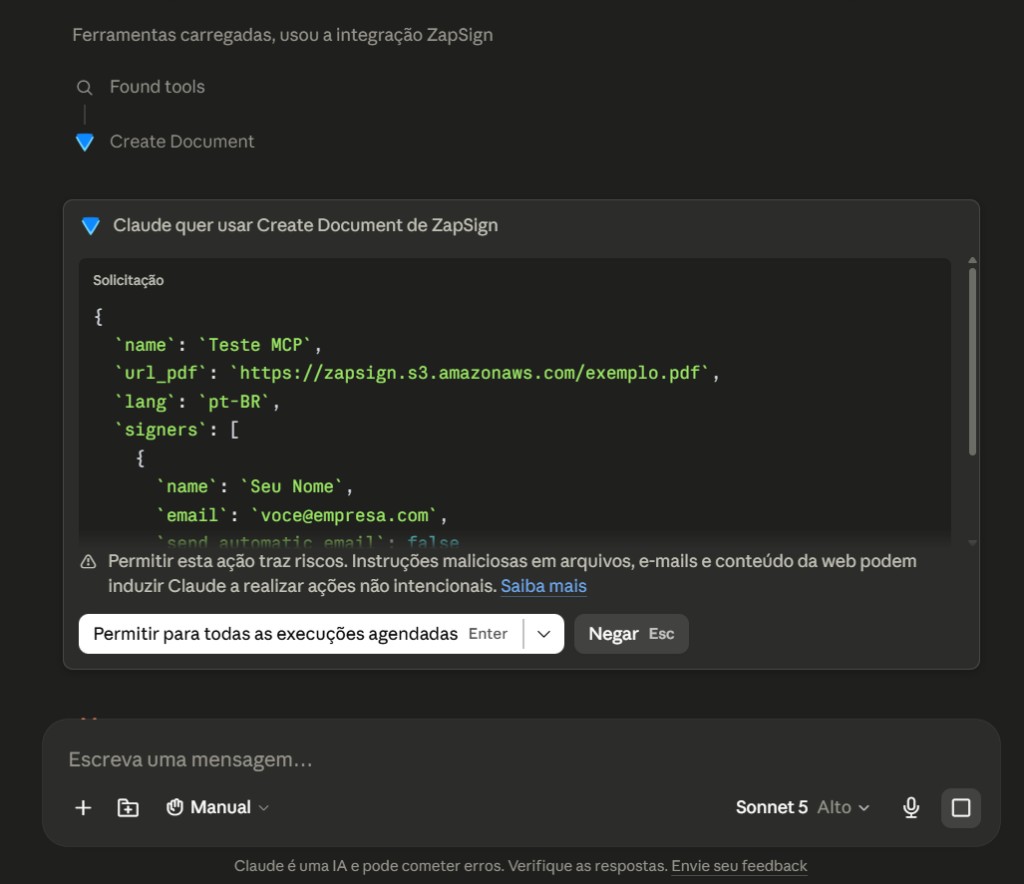
In Claude’s message field, click the tools icon: ZapSign tools such as create_document, list_templates, and add_signer should be listed. Try a prompt:
Create a ZapSign document named "MCP test" from
this PDF: https://zapsign.s3.amazonaws.com/exemplo.pdf
Add signer: Your Name <you@company.com>
and return the signing link.
Claude calls the tool, creates the document in your account, and returns the sign_url. Open the link, sign — done: your first document signed via an AI agent.
Alternative: manual JSON config (for developers)
Add the MCP server to Claude Desktop via JSON
Requires Node.js 18+. Open Claude Desktop’s config file:
- macOS:
~/Library/Application Support/Claude/claude_desktop_config.json - Windows:
%APPDATA%\Claude\claude_desktop_config.json
{
  "mcpServers": {
    "zapsign": {
      "command": "npx",
      "args": ["-y", "mcp-server-zapsign"],
      "env": {
        "ZAPSIGN_API_KEY": "your_api_token",
        "ZAPSIGN_BASE_URL": "https://sandbox.zapsign.com.br/api/v1"
      }
    }
  }
}
Fully quit Claude after editing JSON. Use Quit from the system tray (Windows) or Quit Claude on macOS — closing the window is not enough.
Or add to Claude Code (terminal)
claude mcp add zapsign \
  --env ZAPSIGN_API_KEY=your_api_token \
  -- npx -y mcp-server-zapsign
Verify with claude mcp list — the zapsign server should show as connected.
What to ask Claude next
- "List my pending signature documents and tell me who still needs to sign."
- "Create a contract from the 'Service Agreement' template filling in the client name and tax ID."
- "Add Maria (maria@company.com) as the second signer on document Y."
- "Set up a webhook to notify https://my-api.com/webhook when documents are signed."
Common issues
| Symptom | Likely cause and fix |
|---|---|
| Server does not appear in Claude | Claude was not fully restarted. Quit completely and reopen. |
| Error connecting via URL | Confirm the URL is exactly https://mcp.zapsign.com.br/mcp — no trailing slash or spaces. |
401 Unauthorized | Wrong or revoked token. Generate a new one in Settings → Integrations → API and reconnect. |
| Invalid JSON (manual config) | Trailing comma or bad quotes in claude_desktop_config.json. Validate and restart. |
npx: command not found | Node.js missing or not on PATH (manual config only). Install Node 18+ and reboot. |
| Tool fails creating a document | Ensure the PDF URL is public. For local files, ask Claude to use base64. |
Next steps
- Complete MCP server guide — all tools, SSE mode, and production deploy.
- API Quickstart — integrate ZapSign directly into your product.
- Official API documentation